Travelling by train from Singapore to JB is one of the most common ways of crossing the border.
If you’re wondering how to book train ticket to JB, we’ll explain, step-by-step, the three ways you can go about it.
Read Also: How To Cross The Border From Singapore To Malaysia
1. How To Buy Train Ticket To JB Online
2. How to Buy Train Ticket On KTMB App
3. How To Buy Train Ticket To JB Over The Counter
How To Buy Train Ticket To JB Online
Getting your tickets online in advance is the best way to avoid disappointment. Here’s how:
Step 1: Visit Official KTM Shuttle Tebrau Website
Head on over to the KTM Shuttle Tebrau booking page. Before making any bookings, you’ll need to log in to your account first.


Step 2: Sign Up Or Log In To Your Account
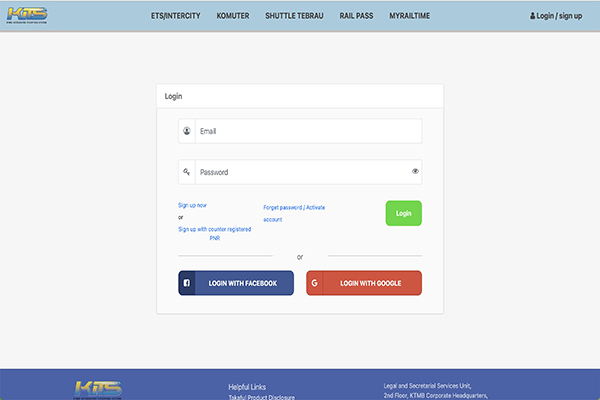
Click “Login/sign up” in the top right corner. You can create an account/log in with Facebook or Google. There is also an option to create an account with your own e-mail.
Step 3: Choose Your KTM Train To JB Travel Date
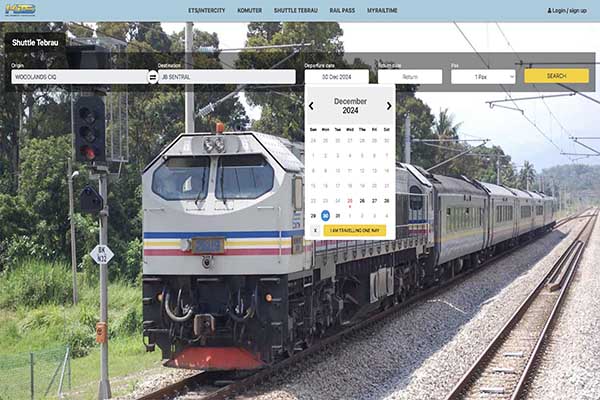
After logging in, proceed to select your date of departure from Woodlands, Singapore, as well as the number of tickets. Choose “I am travelling one way”.
Note:
- Limited to only six (6) tickets per online transaction.
Tip:
- Buying two one-way tickets separately will be cheaper than buying a return ticket.
Step 4: Select Preferred KTM Train To JB Departure Time
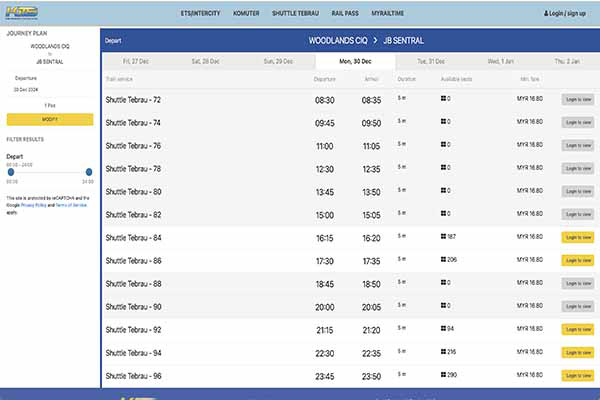
A full schedule of the train to JB will appear here, alongside ticket prices. Choose your preferred departure time.
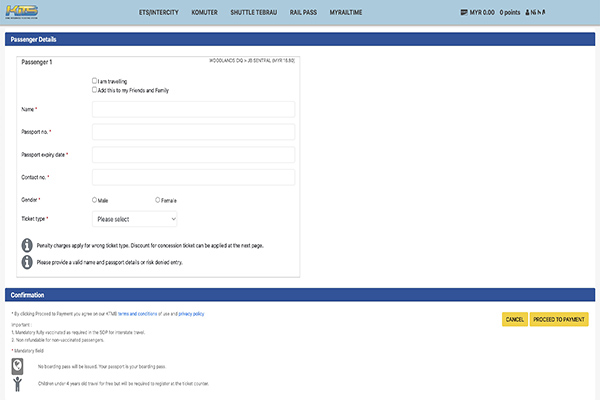
Step 5: Enter All Passenger Details
Fill in passenger details, including passport number.
Note:
- Passport numbers cannot be amended once entered.
- Ensure you have a valid passport (at least 30 days validity before date of departure) prior to booking.
Step 6: Confirm All Details Are Correct, Then Proceed to Payment
Once you’ve made sure that all your details have been entered correctly, go ahead and make payment.
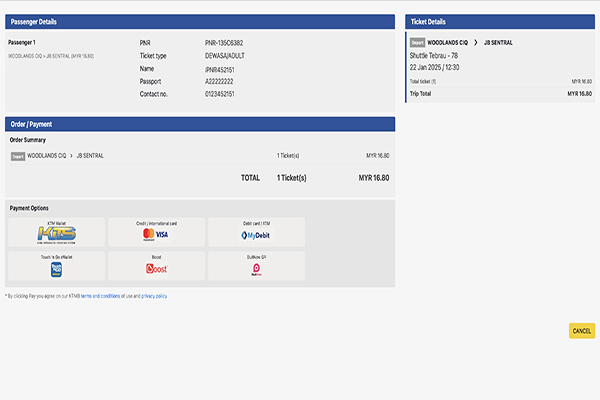
Step 7: Select Mode of Payment and Make Payment.
Choose a mode of payment (Visa and Mastercard credit and debit card options available) to make your payment.
Step 8: Receive E-mail Confirmation
And you’re done! Check your e-mail for booking confirmation.
How to Buy Train Ticket On KTMB App
Another way to get the tickets online is through the official KTM app.
Read Also: What Bus To Take To Woodlands Train Checkpoint
Step 1: Download the KTMB App On Your Phone
The KTMB Mobile app can be found on Google Play (Android), App Store (Apple), and Huawei App Gallery. Skip this step if you already have the app.

Step 2: Sign Up or Login To Your Account
Create an account/log in with Facebook or Google. There is also an option to create an account with your own e-mail.

Step 3: Choose “Shuttle Tebrau” In Ticket Selection
On the ticket selection screen, tap on the “Shuttle Tebrau” icon (3rd option from the left). Input your date of travel and number of tickets.

Step 4 Select Preferred KTM Train To JB Departure Time

Step 5: Enter All Passenger Details

Step 6: Confirm All Details Are Correct, Then Proceed To Payment

Step 7: Select Mode of Payment and Make Payment.

Step 8: Receive Booking Confirmation
You’ll receive a confirmation on the app and in your e-mail.
How To Buy Train Ticket To JB Over The Counter
Alternatively, you can buy tickets over the counter. However, this is not encouraged as tickets are usually sold out, especially during peak season.
Read Also: How To Get From Woodlands Train Checkpoint To Woodlands Checkpoint
Step 1: Head Over To Woodlands Train Checkpoint
Go to Woodlands Train Checkpoint. You can do so by public bus, taxi, or car.

Step 2: Walk To Woodlands Train Checkpoint Ticket Counter
Make your way to the ticket counter.

Note:
- Ticket sales will stop 20 minutes before train departure.
Step 3: Purchase Your Woodlands To JB Train Ticket
Present your passport and make payment in cash.
Note:
- Limited to only four (4) tickets per transaction.
Conclusion
Failed to get train tickets in time for your trip?
How about hiring a private taxi service from Singapore to JB, such as JBTAXI.SG?
With a private taxi, you’ll enjoy a fuss-free and convenient way to travel.